Buy · $49
Implement it with AI. Includes the manual as a .md file for Claude and ChatGPT, with a ready prompt.Includes a .md file.

4-Layer Tracking · Meta Ads + HubSpot

The signal that teaches Meta to sell gets lost on the way.

End-to-end server-side tracking you own: from the ad click to the deal closed in HubSpot, with qualified leads and sales flowing back to Meta. Pay once, run it on your own server, no monthly tracking subscription.

Your campaign records leads. HubSpot records who qualified and who bought. That information almost never reaches Meta. This manual connects your site, a server, the Conversions API and HubSpot in four layers, with ready code, step-by-step validation and a .md file to implement with Claude or ChatGPT, so your campaigns can optimize for commercial results.

$49one-time payment · USD
Get the kit now
  • 7-day refund window
  • Instant download
  • Secure checkout by Gumroad
  • No subscription: pay once
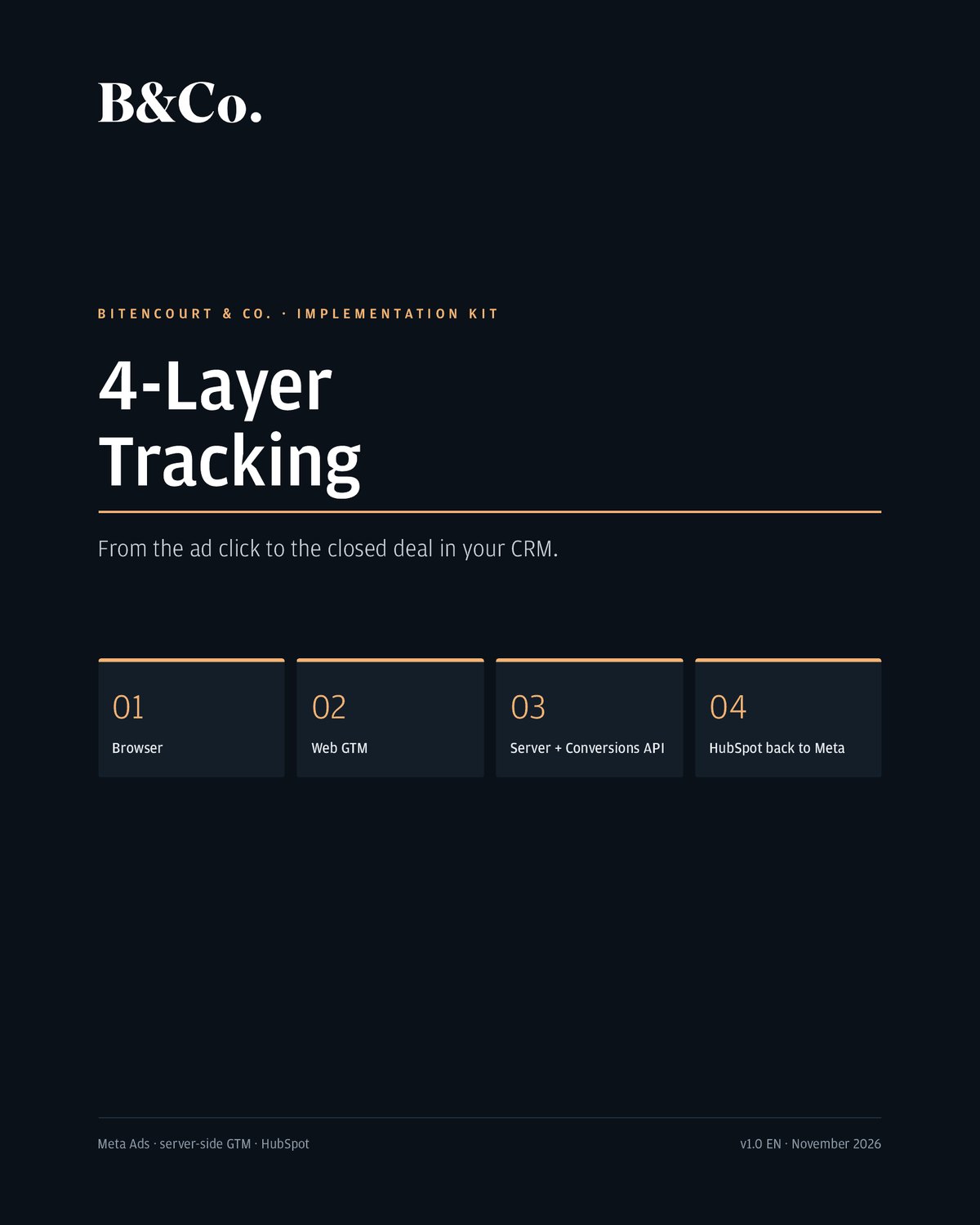
Cover of the 4-Layer Tracking Kit by Bitencourt & Co.
Layers
4
Length
47pages
Failure modes
13
Validation
12steps

Works with what you already use

  • MetaAds
  • Conversions APIserver-side signal
  • Tag Managerweb and server
  • VPS Linuxno extra cost
  • Dockeryour own server
  • Ubuntuor another distro
  • HubSpotCRM
  • HTMLany hosting
  • AI-built siteClaude or ChatGPT
  • WordPressCMS
  • Webflowno-code
  • Framerno-code
  • Stapeoptional, paid
Image 01 · sceneSame photo as the Portuguese page (../foto-01-cena.jpg).foto-01-cena.jpg · 2400×1000

Meta knows who filled in the form. HubSpot knows who qualified and who bought.

Sound familiar?

Plenty of leads, few sales. And nobody can say which campaign works.

If you advertise on Meta and close through a sales team, at least one of these probably shows up every week.

Image 02 · the leadSame photo as the Portuguese page.foto-02-lead.jpg · 1200×1500
  • Sales complains about lead quality.

    People who don't pick up, aren't a fit or have no budget. The volume is there, the sales aren't.

  • Ads Manager and the CRM tell different stories.

    Conversions that don't match and sales with no source ad. Attribution becomes guesswork.

  • Cost per lead rises or swings for no clear reason.

    Campaigns that worked stop delivering, and the learning phase never seems to end.

  • Budget is decided by cost per lead.

    Because nobody can measure cost per qualified lead, or cost per sale.

The cause

The problem isn't the campaign. It's the signal that reaches it.

Meta's algorithm optimizes with what it receives. If the data arrives incomplete, it learns the wrong thing, and tells no one.

  1. Leak 1 · browser

    The conversion happens. Meta doesn't see it.

    On iPhone, people who opt out of tracking vanish from the pixel. Safari shortens cookie life and ad blockers kill the event before it leaves the page.

    handled in layers 1 to 3
  2. Leak 2 · attribution

    The event arrives, but belongs to no one.

    Without email, phone or a click ID, Meta can't tie the conversion to a person or to the ad that brought them. Match quality drops and attribution is lost.

    handled in layers 1 and 3
  3. Leak 3 · CRM

    Quality is decided off the site.

    In sales, days later, the lead is qualified, discarded or becomes a deal. No pixel sees that. For Meta, the form is still the end of the story, and it optimizes for that.

    handled in layer 4

Browser-only tracking loses the signal at all three points. Most implementations fix the first one at most.

What it costs

Without signal, budget buys volume. It doesn't buy intelligence.

Every dollar spent on media should teach the campaign to find buyers. When the signal is lost, the spend continues and the learning doesn't.

  1. 01

    The algorithm optimizes for form fillers.

    It looks for more people like those who submitted the form, including those who were never going to buy. Qualification drops and sales spends time on cold leads.

  2. 02

    Budget decisions become opinions.

    Without tying the ad to the sale, cuts are made by cost per lead. The campaign that sells may get switched off, and the one that only generates sign-ups may get scaled.

  3. 03

    Every month without signal is lost learning.

    The history that should teach the account to find buyers stays empty. The campaign only starts learning from quality on the day that signal starts reaching it.

The solution

Four layers to get the signal there whole.

Each layer closes a leak and hands the signal to the next. The fourth does what almost nobody does: it sends what happens in HubSpot back to Meta.

Once it's in place

Signal

Events captured on the site can reach Meta through the server even when the browser fails, with consent respected.

Attribution

Stored identifiers help tie qualified leads and sales to their source ads, when the data is present.

Optimization

With qualification and sales set up, campaigns can optimize on signals closer to commercial results.

Decisions

You get a basis to judge cost per qualified lead and per sale, not just cost per sign-up.

Simulator

What reaches Meta?

Switch the setup and see, lead by lead, what the campaign receives. Illustrative example with 8 leads; real loss varies by audience and site.

LeadFormQualificationSale

What this doesn't guarantee: more signal doesn't lower cost per sale on its own. Data quality, conversion volume and campaign setup still decide. What changes is that your campaign gets the right signal to learn from.

All four layers, with the code ready.Including layer 4: the bot that sends qualification and sales from HubSpot back to Meta.

The kit

A hands-on implementation manual, not a course.

A 47-page manual with copy-ready code. Layer 4 is written for HubSpot's current API; with another CRM, the logic is the same and only the endpoints change.

Start with the value sheet.

Fill it in once and the whole manual speaks about your project.
Get the kit
Image 03 · manual mockupEnglish cover in front, an inside page with code behind. PNG with transparent background.mockup-pdf-en.png · 1200×1440

What's inside

An implementation procedure, from the first event to validation.

The manual follows the order of the work. Each stage has what to do, the code or setting, and how to confirm it worked.

  1. 01

    Prepare the project

    Fill in the value sheet once and pick your site's branch.

    Value sheetCMS decisionsConsole check
  2. 02

    Instrument the events

    The event is born on the page with a unique ID, without tying the code to a destination.

    Layer 1 codeConsent Mode, GDPR and US privacy
  3. 03

    Set up forwarding

    Web GTM, your own server on a VPS with Docker and the Conversions API, with deduplication.

    Web GTMGTM Server on DockerConversions APIcPanel and nginx proxy
  4. 04

    Send HubSpot back to Meta

    The bot reads the pipeline and sends qualified, disqualified and won deals with the real amount.

    Python return botLead Ads into HubSpotHubSpot API pitfalls
  5. 05

    Validate

    Each step isolates one stretch. If something fails, you know exactly where.

    12-step validation ladderImplementation checklist
  6. 06

    Diagnose and maintain

    Almost no failure produces a visible error. The manual shows how to find each one.

    13 failure modesMaintenance routine

Real pages from the manual

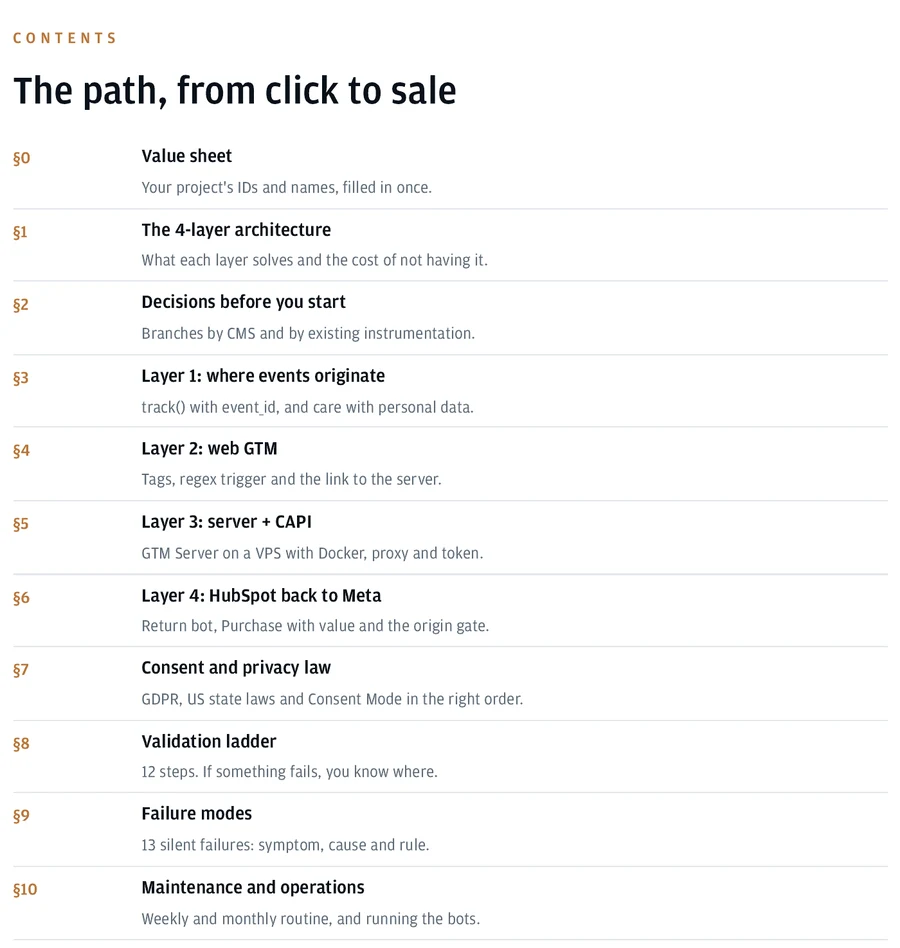
Contents of the 4-Layer Tracking manual: from the value sheet to the four layers, consent, validation, failure modes and appendices
Contents. The manual's order is the implementation order.
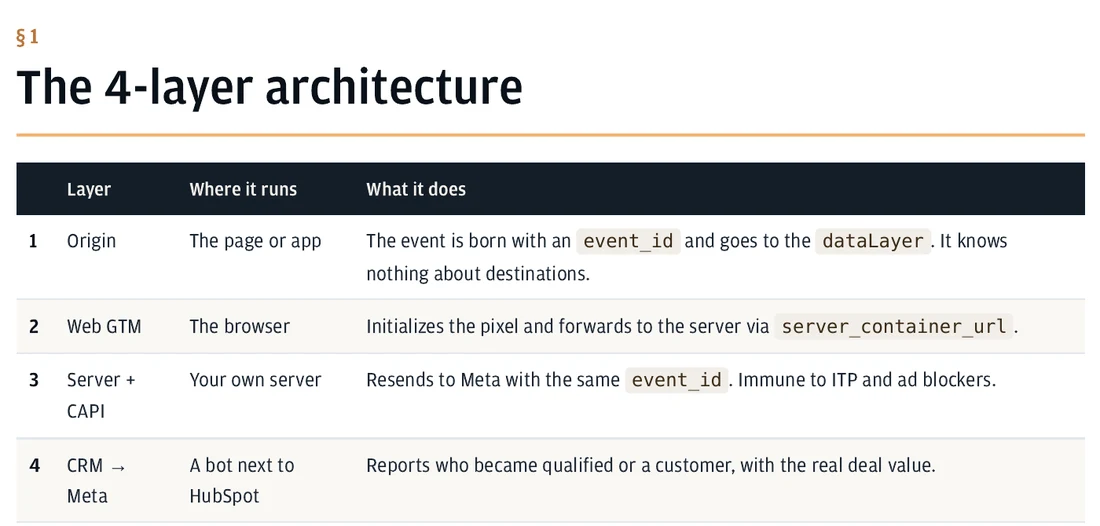
The 4-layer architecture: origin, web GTM, server with Conversions API and HubSpot back to Meta
§1 The architecture. The four layers and what each one solves.
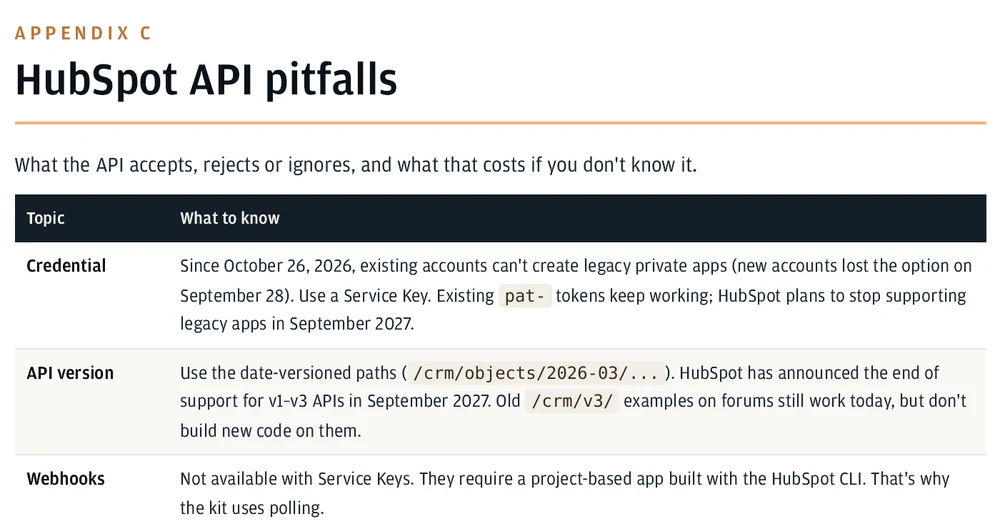
Appendix C of the manual: HubSpot API pitfalls
Appendix C · HubSpot API pitfalls. What the API accepts, rejects or ignores.
PDF manual

To read, look up and tick off

47 pages in implementation order, with tables, code, the 13 failure modes and a printable checklist.

.mdAI file

To implement in conversation

The same content in Markdown, with a ready prompt. The assistant leads one layer at a time, cites the manual's section and checks the failure modes.

Version 1.0 EN · November 2026

In practice

Fill in, run, validate.

Three excerpts from the manual, in the order you use them. The example values are fictional.

  1. 1Fill in · §0 Value sheet

    PlaceholderValue
    {{PIXEL_ID}}123456789012345
    {{SGTM_DOMAIN}}sgtm.yourcompany.com
    {{PIPELINE_ID}}default
    {{WON_STAGE_ID}}closedwon
    The rest of the manual uses these names.
  2. 2Run · §5.2 There are two containers

    services:
      sgtm:
        image: gcr.io/cloud-tagging-10302018/gtm-cloud-image:stable
        environment:
          PREVIEW_SERVER_URL: "https://{{SGTM_PREVIEW_DOMAIN}}"
      sgtm-preview:
        image: gcr.io/cloud-tagging-10302018/gtm-cloud-image:stable
        environment:
          RUN_AS_PREVIEW_SERVER: "true"
    Without the preview container, the debug screen opens blank.
  3. 3Validate · §8 Validation ladder

    #TestPasses if
    4Network, filter sgtm200 OK with evnid=
    7Events Manager with Test IDSame event_id, browser and server
    8Remove the Test ID and publish—
    11Move the deal to closed wonPurchase with amount
    12 steps in all, from the console to declined consent.

Sample

See the level before you pay.

A code excerpt and one of the 13 failure modes, copied from the manual. Not technical? What matters here: the code comes ready, and each failure comes with the sign to recognize it and the rule to avoid it.

What the code does
Creates the event once and hands it to the pixel, GA4 and the dataLayer with the same ID.
What it prevents
One broken destination silently taking down the others (§9.5), and the event counting twice (§9.7).
How to check
In GTM Preview, the event shows with event_id filled in. That's step 2 of the validation ladder.
§2 · Layer 1 · a healthy instrumentation pattern
function track(event, props = {}) {
    if (typeof window === "undefined") return

    const eventId = "e_" + Date.now() + "_" + Math.random().toString(36).slice(2, 10)
    const payload = { ...props, funnel: "{{FUNNEL_NAME}}", event_id: eventId }

    // one try/catch PER destination, never one wrapping all of them
    try { if (typeof window.fbq === "function") window.fbq("trackCustom", event, payload, { eventID: eventId }) } catch (e) {}
    try { if (typeof window.gtag === "function") window.gtag("event", event, payload) } catch (e) {}
    try {
        window.dataLayer = window.dataLayer || []
        window.dataLayer.push({ event: event, ...payload })
    } catch (e) {}
}

Failure mode · the most expensive

§9.2 · one of 13

Competing analytics snippet

Symptom
server_container_url saved, published and validated, and hits still going straight to Google.
Cause
gtag applies the transport setting of the first config that runs. A raw snippet injected by the CMS arrives first and hijacks the destination.
Diagnosis
Look for a gtag/js without &gtm= in the URL.
Rule
Two things doing the same job, and the one you configured isn't the one that's live.

The other 12 failure modes are in the manual.Same format: symptom, cause, diagnosis and rule.

Assisted implementation

Implement it with AI, one layer at a time.

You don't need to write the code from scratch or work out the sequence alone. The .md file includes a prompt for Claude or ChatGPT to lead the implementation using the manual as the reference: the assistant helps you run the commands, read the errors and check each stage's validation. You still need access to the technical environment and to validate each setting. If you prefer, hand the manual to your developer or agency.

.md4-Layer-Tracking-Kit-BCo-HubSpot-AI.md1,350 lines
## Prompt to paste into your AI assistant

You are going to help me implement 4-layer
tracking using the attached manual.

1. The manual is the source of truth. Cite
   the section (e.g. §5.2, Appendix C).
2. Start by filling in the value sheet (§0)
   with me, one block at a time.
3. Go layer by layer. Don't move on until the
   validation ladder steps (§8) pass.
   …
5. When something "looks right but doesn't
   work", check §9 before proposing new code.

# §5 Layer 3: server + CAPI
```yaml
services:
  sgtm:
    image: gcr.io/cloud-tagging-10302018/…

Why a .md file?

Markdown is the format AI assistants read best. Headings, tables and code blocks arrive intact, without the losses of a converted document. You attach the file, paste the prompt, and the assistant leads the implementation citing the manual's section at each step.

  • Works with Claude, ChatGPT and Gemini
  • Implementation prompt ready at the top of the file
  • The assistant checks the 13 failure modes before suggesting another cause
  1. 01

    A Linux VPS with a terminal

    The ideal setup. It runs the layer 3 server and the HubSpot return bot.

    UbuntuDocker
  2. 02

    The manual, in two versions

    One to read, look up and tick off the checklist. Another to load into Claude or ChatGPT, with a ready prompt, and implement in conversation.

    Manual · 47 pages.md file + prompt
  3. 03

    Claude or ChatGPT at your side

    Attach the .md file, paste the prompt and implement one layer at a time. When something fails, paste the error: the assistant checks the 13 failure modes before suggesting another cause.

    ClaudeChatGPT

Who it's for

For teams that run Meta ads and need sales, not leads.

For whoever pays for the media and whoever implements the tracking.

Image 04 · who does itSame photo as the Portuguese page.foto-04-equipe.jpg · 1000×1400

Who it's for

  • Companies that invest in Meta Ads, get leads that don't buy and can't tell which campaign brings sales.
  • Marketing managers who need to prove return on spend with sales, not sign-ups.
  • Media buyers who deliver leads and can't prove sales.
  • Agency developers who need to set up server-side tracking and the Conversions API without weeks of trial and error.

Nobody on your team is technical? With a Linux VPS and Claude or ChatGPT, you can implement it yourself. Or hand the manual to your agency and follow along layer by layer through the 12-step validation.

Who it's not for

  • Anyone looking for a plug-and-play tool. This is an implementation manual: someone on your side does the work.
  • Anyone advertising only for reach, with no conversion to measure.

Before you buy

What you need to implement it.

It's an implementation manual, not a ready-made tool. Check that your setup fits.

Developer

Implements it directly, with the documentation and the code.

Media buyer

Runs the stages with AI support and validates each setting.

Business owner

Uses the manual to specify, hire and oversee the implementation.

You need

  • A site, landing page or form that generates leads
  • Access to Meta Business Manager, Google Tag Manager and your site's CMS
  • A Linux VPS with a terminal, or a managed server-side GTM service
  • HubSpot, with Super Admin or developer access to create a Service Key. Another CRM works if you swap the endpoints

You can do it with

  • Claude or ChatGPT, using the .md file and the ready prompt
  • Your developer or technical team
  • Your agency, with the manual as the specification

Keep in mind

  • Infrastructure cost: zero if you already have a VPS; an entry-level VPS runs about $6 to $30 a month
  • Adapting it depends on your site, your HubSpot setup and your permissions on each account
  • More signal doesn't guarantee, on its own, a lower cost per sale

FAQ

Questions about tracking, the Conversions API and the kit

What is the .md file and how do I use it?

It's the whole manual in Markdown, the text format AI assistants read best. Open a chat in Claude, ChatGPT or Gemini, attach the file and paste the prompt at its top. The assistant then walks you through the implementation one layer at a time, citing the manual's section in each instruction and checking the failure modes when something goes wrong.

What is Meta's Conversions API?

It's the way to send events to Meta from your server, not only through the pixel in the browser. Because it doesn't depend on the browser, it isn't affected the same way by ad blockers and by Safari and iOS restrictions. Meta joins both sends by event_id and counts the event once.

What is server-side GTM?

It's a Google Tag Manager container that runs on a server you control instead of in the visitor's browser. It receives events from the site and forwards them to Meta and other destinations. The manual sets that server up on a VPS with Docker.

How do I send HubSpot conversions back to Meta?

When a deal moves to a stage you track, a bot reads the change through HubSpot's API and sends the event to the Conversions API, with matching data and, for a closed deal, the amount. That's layer 4 of the kit, with the Python code ready, written for HubSpot's current API.

Isn't HubSpot's native Meta integration enough?

Sometimes. HubSpot can send lifecycle stage changes and HubSpot form submissions to Meta on Marketing Hub Starter and above. The manual explains when that's enough and when it isn't: forms outside HubSpot, a pixel that lives in GTM with server-side tracking, or deal-stage events with the real amount. It also warns against running both for the same conversions.

Will the kit lower my cost per lead?

There's no guarantee it will lower your cost per lead or your cost per sale. More complete tracking gives optimization additional signals, and when a campaign starts optimizing for qualified leads or sales, cost per lead may even go up while cost per sale goes down. The core benefit is having the data and being able to judge campaigns by commercial results.

Can I optimize for qualified leads instead of sales?

Yes, and it's often the better path. With a long sales cycle or few sales a month, qualified leads give the campaign more events to learn from. The kit sends each funnel stage as a separate event, and you choose which one the campaign optimizes for.

Does this fix the iOS signal loss?

It reduces what gets lost in the browser. The event also leaves from your server, which gets around ad blockers and Safari's cookie limits, and reaches Meta with the data that helps match the person. The choice of people who declined tracking is still respected, and the kit handles consent in the right order.

I'm not technical. Will this work for my company?

Yes. The simplest path is a Linux VPS with terminal access and an AI assistant like Claude or ChatGPT working alongside you, step by step. If you'd rather delegate, the manual works as a specification for your agency or developer.

Do I need a server?

For layer 3, yes. The best setup is your own Linux VPS: if you already have one, the server runs on it at no extra cost. If you don't, an entry-level VPS costs roughly $6 to $30 a month, and the manual has a table to help you choose. Managed services like Stape or Cloud Run also work.

My site is plain HTML, Framer, or built with AI. Does it work?

Yes. The manual has branches for Framer, WordPress, Webflow, HubSpot CMS and custom apps, and a plain HTML site, including one built with Claude or ChatGPT and hosted anywhere, follows the custom app branch.

Does it work with a CRM other than HubSpot?

The bot's logic works with any CRM that has an API, but the code and appendices are written for HubSpot. With another CRM you swap the endpoints.

Does it cover Google Ads?

The focus is Meta Ads and the Conversions API. Layers 1 and 2 (origin and web GTM) work for any destination.

Do I need to know how to code?

You don't need to be a developer, but you need to follow technical steps, use a terminal with help from an AI assistant, and have access to the accounts involved: Meta, Google Tag Manager, your site, a server and HubSpot. The manual has the code and commands ready, including the layer 4 bot in Python. If you prefer, hand the manual to your agency or developer.

How do I get it?

Right away, by email and in your Gumroad library, as soon as the payment goes through. You get the manual (PDF) and the .md file for AI, with the implementation prompt ready.

What if it's not what I expected?

You have a 7-day refund window. Just request a refund through Gumroad.

Who wrote it

Toni Bitencourt

Founder of B&Co. · CEO of Nidus

LinkedIn

I first built this tracking for a client, on a real funnel, with the server running on our own operation's VPS. Along the way came the problems nobody documents, and each one became one of the manual's 13 failure modes.

Then I generalized the playbook to work with other sites and CRMs and wrote it the way I'd have wanted to read it: in implementation order, with the code ready and what to check at each step.

I've spent almost ten years working where marketing, sales and technology meet. Today I run Nidus, which serves mid-size and large companies in southern Brazil, and Bitencourt & Co.

4-Layer Tracking Kit

Make every media dollar buy intelligence.

Stop teaching Meta to bring form fills. Implement the four layers and give your campaigns the signal of who qualifies and who buys, with the code ready and the pitfalls documented.

What you get

  • Value sheet
  • CMS decisions
  • GTM Server on a VPS with Docker
  • HubSpot return bot
  • Lead Ads into HubSpot
  • HubSpot API pitfalls
  • Consent: GDPR and US privacy laws
  • 12-step validation ladder
  • 13 failure modes
  • Implementation checklist
  • .md file for AI, with a ready prompt

Kit · manual + .md file

$49

one-time payment · USD

  • 47-page PDF manual
  • .md file for AI, with prompt
  • Ready code and settings
  • 12-step validation and checklist
Get the kit now

Secure checkout by Gumroad · taxes handled at checkout

7-day refund window. If it's not what you expected, request a refund through Gumroad.
Rather have B&Co. implement it? Full implementation is quoted per project, based on your site, HubSpot setup and server.

Request a quote →